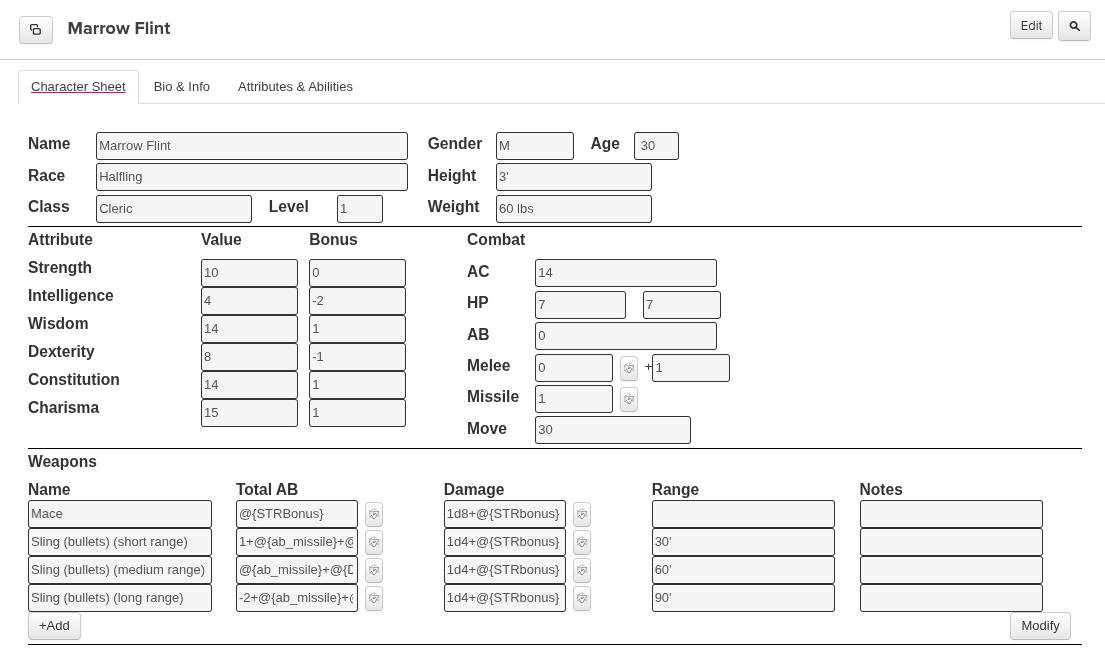
I recommend playing in Basic Fantasy RPG, D&D, etc. in person if possible. However, if you are going to make use of computers such as for playing the game with people with whom you couldn’t otherwise, this guide will make the best use of Roll20. Making the best use of technology means making it get out of the way so it isn’t a distraction from what you are trying to do. It can also reduce rule lookups with regard to modifiers if you use macros, or by using tricks I’ll explain such as multiple weapon slots for short, medium, and long range for a single weapon.
In keeping with BFRPG, this article is released under the Creative Commons Attribution-ShareAlike 4.0 license. If you do not yet have Basic Fantasy Roleplaying Game, you can download it from basicfantasy.org, but to go beyond that, all of the code is CC0 and probably non-copyrightable due to being trivial.
Maybe you use Roll20 and type:
/r d20+1
without a macro. That’s pretty easy. Or maybe use the character sheet, or maybe that isn’t enough and you would like some information to make macros easier to use. Or maybe you forgot to add another +1 for a short range bonus. In any of those cases, using variables from your Roll20 character sheet can help. Though several variables are specific to Basic Fantasy RPG’s Roll20 plugin, you could figure out how it will work in another system as well (You can see all variable names in the “Attributes and Abilities” section of your character sheet on Roll20).
Of course, you can also type any of these commands without creating a macro (such as, type a word after the dice to show what your are rolling), so the main advantage is making a button (or typing macro name such as #*init or #silverdagger). However, most macros can be replaced by using Roll20’s BFRPG character sheet fields in a certain way and using placeholders as I’ll explain so the dice buttons (under “Total AB” and “Damage”) use your stats properly when using BFRPG.
Make the Dice Buttons Use Your Stats
I found a way to fill out that section that allows synchronizing weapons with your stats:
- To the right of “AB” enter your AB (It is called {ab_normal} in macros).
- Leave Melee ({ab_melee}) and Missile ({ab_ranged}) both blank, because they will be calculated automatically (by adjusting ab_normal by STRbonus or DEXbonus respectively).
- There is a second box after “Melee” which just says “+”. Put your AB there as well (It will make formulas for the weapon rows shorter, but if you exclude it from the formula that AB will still be added and shown when rolling).
- If you have a ranged weapon bonus (1 for Halfling) that will have to be entered manually (as
+1[missiles]) into each formula, due to two points above.
After you have set the fields that way, you can enter variables into weapon rows instead of having to update the numbers each time your AB changes. You can make a row for each range. You can label a roll, variable, or number by placing any word or phrase in brackets after it as shown below (such as STR or short range adjustments).
Total AB
The {combat_adjust} is always added, so if you put your AB there on your character sheet (after “+”) as suggested you don’t need any more variables than the ones shown below. Under “Total AB” you can enter the following (permanently):
| Name | Total AB |
| Melee Weapon | @{STRBonus}[STR] |
| +1 Magic Melee Weapon | 1[weapon]+@{STRBonus}[STR] |
| Sling bullet (short range) | 1[short range]+@{DEXbonus}[DEX] |
| Sling bullet (medium range) | @{DEXbonus}[DEX] |
| Sling bullet (long range) | -2+@{DEXbonus}[DEX] |
You can change the name from “Melee Weapon” to the specific weapon if you have multiple melee weapons where damage dice size or magic bonus differs.
If character is a halfling (gets missile bonus):
1[short range]+@{DEXbonus}[DEX]+1[missiles]
Remember, in all cases above, the value after “+” on the character sheet is added (To attack die d20 button clicked on any weapon row).
For melee, if you are using Weapon Specialization from the Combat Options Supplement, you can add that adjustment to the field similarly:
@{STRbonus}[STR]+1[weapon specialization]
NOTE: If you set the blank after “+” {combat_adjust} to 0 you would actually put the total under Total AB so it is probably labeled that way for that workaround.
Damage
Above “Sling” lines can be used for any missile, but “Damage” and “Range” may differ.
| Name | … Damage |
| Sling bullet | 1d4+@{STRbonus}[STR] |
| Sling stone | 1d3+@{STRbonus}[STR] |
| Shortbow | 1d6 |
STRBonusapplies to melee and any thrown weapon damage including for slings.STRBonusdoes not apply to any bow or crossbow damage.
Range
You can get the numbers from Basic Fantasy RPG 4th Edition p. 11 “Missile Weapon Ranges” and fill in the range for each Sling and Shortbow row or other ranged weapon.
Macros
I use the “/r” command in macros instead of formatted messages. An example of a formatted message would be /r @{selected|character_name} Melee Attack: [[d20, but the “+@{selected|STRbonus}+@{selected|ab_normal}]]/r” command allows you to see the raw roll and modifiers. See “GM notes” at the bottom of this article for a shorter macro which shows only the total of those two variables.
Adding a Macro
Click the macros tab on the right (3-dice symbol), then “Add.”
Adding buttons for macros
I just check “In Bar” in the list of macros for ones that apply to me, and make sure “Show macro quick bar?” is checked so the bar will appear (When you make a macro, “Show As Action Token” in the edit macro screen may make the macro visible for everyone, so I would avoid or limit that since it could get cluttered).
Macros for Basic Fantasy RPG
When I name my macros, I start with “*” when I use “selected” in the macro to indicate it is a wildcard (works with any selected character. See also “Non-wildcard macros” section). These may be modified for other systems (or optional rules such as Weapon Specialization from the Combat Options Supplement).
*init/r d6+@{selected|DEXbonus}[DEX] @{selected|character_name} initiative
For melee attacks, you may want to skip the rest of this and use the Weapons section on BFRPG’s Roll20 character sheet to roll as described above. However, for rear attacks, point-blank ranged attacks, and attacks with multiple ranges, or multiple characters, you could create the following macros (suggested name on the line before “/r“).
If you use “ab_melee” in macros, that would be less explicit (you couldn’t see the individual STRbonus and ab_normal when rolling). But it can be used to replace STRbonus and ab_normal (See “GM notes” at end of article).
*melee/r d20++@{selected|STRbonus}@{selected|ab_normal}[AB] @{selected|character_name} melee attack
If using a +1 melee weapon weapon:
*melee-magical+1/r d20+@{selected|STRbonus}[STR]+@{selected|ab_normal}[AB]+1[weapon] @{selected|character_name} melee attack
If you are using the Combat Options supplement and have a +1 bonus from a weapon rank:
*melee-specialized+1/r d20+@{selected|STRbonus}[STR]+@{selected|ab_normal}[AB]+1[weapon specialization] @{selected|character_name} melee attack
*range-short/r d20+1[short range]+@{selected|DEXbonus}
*range-medium/r d20+@{selected|DEXbonus}
*range-long/r d20-2[long range]+@{selected|DEXbonus}
Damage
I separate the damage by modifier instead of weapon type so that one macro/button can be used for multiple purposes:
- melee and thrown (including sling): “+str”
- bow or crossbow: without the strength adjustment
As usual, you probably only want to add (or show “In Bar”) ones that apply to your character(s).
*damage-d3+str/r d3+@{selected|STRbonus}[STR] @{selected|character_name} damage
*damage-d4+str/r d4+@{selected|STRbonus}[STR] @{selected|character_name} damage
*damage-d6+str/r d6+@{selected|STRbonus}[STR] @{selected|character_name} damage
*damage-d8+str/r d8+@{selected|STRbonus}[STR] @{selected|character_name} damage
*damage-d4/r d4 @{selected|character_name} damage
*damage-d6/r d6 @{selected|character_name} damage
*damage-d8/r d8 @{selected|character_name} damage
Weapon Names
You could customize these with names if that helps you and you don’t mind having more, or have only one character and want to skip ones above you may not remember (or you could just type the amount, but these may help if you haven’t memorized them or don’t have notes on them):
*damage-d3+str-sling-stone/r d3+@{selected|STRbonus}[STR] @{selected|character_name} damage
*damage-d4+str-sting-bullet-or-dagger/r d4+@{selected|STRbonus}[STR] @{selected|character_name} damage
*damage-d6+str-short-sword/r d6+@{selected|STRbonus}[STR] @{selected|character_name} damage
(but several weapons use d6 so it may be more confusing than clarifying. Probably just keep the weapon page open if controlling multiple characters, or name it *damage-d6+str-short-sword-OR-hand-axe)
*damage-d8+str-battle-axe/r d6+@{selected|STRbonus}[STR] @{selected|character_name} damage
(Convenient if you only have one d8 weapon, otherwise same naming issue here: multiple weapons use d8)
Without Strength Adjustment
Only a few ranged weapons without str adjustment share the same dice size (unless using Equipment Emporium?), so naming by weapon is pretty clear in these cases.
*damage-d6-shortbow-or-light-crossbow/r d6 @{selected|character_name} damage
*damage-d8-longbow-or-heavy-crossbow/r d8 @{selected|character_name} damage
Even more macros
This may be a few too many, or may help. You decide. It will be less cluttered if you only add (or only check “In Bar”) for ones that apply to you.
Or to be even less cluttered, skip this section entirely and put the totals of all adjustments on a paper character sheet so you can add just one total modifier.
For example, if you write the following on your character sheet
(if your AB is 2, or AB is +1 with ranged weapon +1 additional if halfling; then add the +1/+0/-2 adjustments to get the following totals):
Sling 30’/60’/90′: +3/+2/+0
(then add the -5/+3 adjustments for point blank for the following totals):
Any point blank missile: -3 (+5 from behind if enemy is busy)
Of course, change the numbers whenever your AB changes using Basic Fantasy Role-Playing Game 4th Edition p. 54 (Missile Fire) as described in parenthesis above. I am using the term “point blank” as shorthand to indicate the penalty for using a missile when engaged in melee (5′). The other ranges are on p. 11 (Missile Weapon Ranges).
Then you never have to add more than one number, so you don’t need a macro. You know what you are doing, so if you are doing a short-ranged attack (30′ or less for sling, but not point-blank), you can just type: /r d20+3
in chat by looking at your paper character sheet.
However, if you don’t have a paper character sheet, the following macros will synchronize everything with the modifiers on your Roll20 character sheet and accomplish the same thing with macros/buttons.
*melee-from-behind/r d20+2[from behind]+@{selected|STRbonus}[STR]+@{selected|ab_normal}[AB] @{selected|character_name} melee attack from behind
*ranged-short-from-behind/r d20+2[from behind]+1[short range]+@{selected|DEXbonus}[DEX]+@{selected|ab_normal}[AB] @{selected|character_name} short range attack
*ranged-medium-from-behind/r d20+2[from behind]+@{selected|ab_ranged}[missiles]+@{selected|DEXbonus}[DEX]+@{selected|ab_normal}[AB]
*ranged-long-from-behind/r d20+2[from behind]-2[long range]+@{selected|DEXbonus}[DEX]+@{selected|ab_normal}[AB]
*ranged-point-blank/r d20-5[point blank missile]+@{selected|DEXbonus}[DEX][AB] @{selected|character_name} point-blank ranged attack
*ranged-point-blank-from-behind-distracted/r d20+1[short range]+2[from behind]+[AB]+@{selected|character_name} point-blank ranged attack distracted creature from behind@{selected|DEXbonus}@{selected|ab_normal}
(or you could combine this with short range from behind, and give it a longer name and only need one macro for both: *ranged-from-behind-short-or-point-blank-distracted)
Non-wildcard macros
Using the wildcard for character but showing a specific weapon name:
*silverdagger/r d20+@{selected|STRbonus}[STR]+@{selected|ab_normal}[AB]
If you replace “selected” with character name in the macro, it will apply the character’s modifier even without selecting token. For example (replace my name with another name):
init:/r d6+@{Morrow Flint|DEXbonus}[DEX] initiative
silverdagger:/r d20+@{Morrow Flint|STRbonus}[STR]+@{Morrow Flint|ab_normal}[AB]
(As usual, if thrown use DEXbonus for attack roll and STRbonus for damage roll. For other ranged weapons, do the same but no STRbonus to damage)
GM notes
Example macro for Gamemaster which hide the modifier. The natural roll and modifier can both still be shown by hovering over the total, but you may want to avoid these since you may forget to check (and not take into account a natural 20 or natural 1). Therefore, the macros above are still recommended.
*hidden-melee/em @{selected|character_name} makes a melee attack [[d20+@{selected|ab_melee}]]
The natural roll is preserved as $[[0]] if used in the same macro, but it only works if using a straight roll not a formula. It does not work within a formula, nor show the natural roll if using it outside of a formula, but you can at least hover over the total to see how it was calculated if you include all modifiers (instead of hiding the two values which are included in ab_melee automatically above):
*hidden-melee-showing-modifiers/em melee attack [[d20+@{selected|STRbonus}+@{selected|ab_normal}]]
For the damage roll, you can split the damage by whether it adds STRbonus as usual:
*hidden-damage-d6+str/em @{selected|character_name} damage: [[d6+@{selected|STRbonus}]]
Or for ranged weapon that is not thrown, add no stat-based damage bonus:
*damage-d6/em @{selected|character_name} damage: [[d6]]
or as a reminder, use a longer name for the macro:
*damage-d6-shortbow-or-light-crossbow/em @{selected|character_name} damage: [[d6]]
Back to Paper
To make it easy on yourself, especially if not using a computer (or you don’t want macros), just write down your “Total AB” with a pencil. Seeing “rolling 1d20+1[short range]+-1[DEX]+1[missiles]+1” or “1d20+0[STR]-2[kick]+1” may be useful when using a computer or learning how the game works, but not when doing it by hand (or in your head). So just add them together (short range in the case above) and write all 3 ranges:
| Attack Bonus | +1 | |
| Brawling | +1/-1 kick | 1d3/1d4 kick, subduing damage |
| Sling 30’/60’/90′ | +2/+1/-1 | 1d3 stone/1d4 bullet + 0 str.adj. |
If you have a sheet like that, you can just adjust by:
- +2 when it is short range up to 30′ if using a sling
- +1 up to 60′ (medium range for sling)
- -1 up to 90′ (long range for sling–beyond that you can’t hit)
Or, you can use your paper sheet along with Roll20:
- type in chat:
/r d20+2 - or set combat_adjust (after “+” on the character sheet after the Melee blank) to “0” and put those totals from your sheet in the weapon rows under Total AB.
Then change the numbers whenever you reach a level that increases your Attack Bonus. Then you only have to add the single number, and you don’t have to look at the adjustments that created the number except when making a new character or reaching those levels.